Instant download after payment. Save the file and it is yours to keep, on any device.
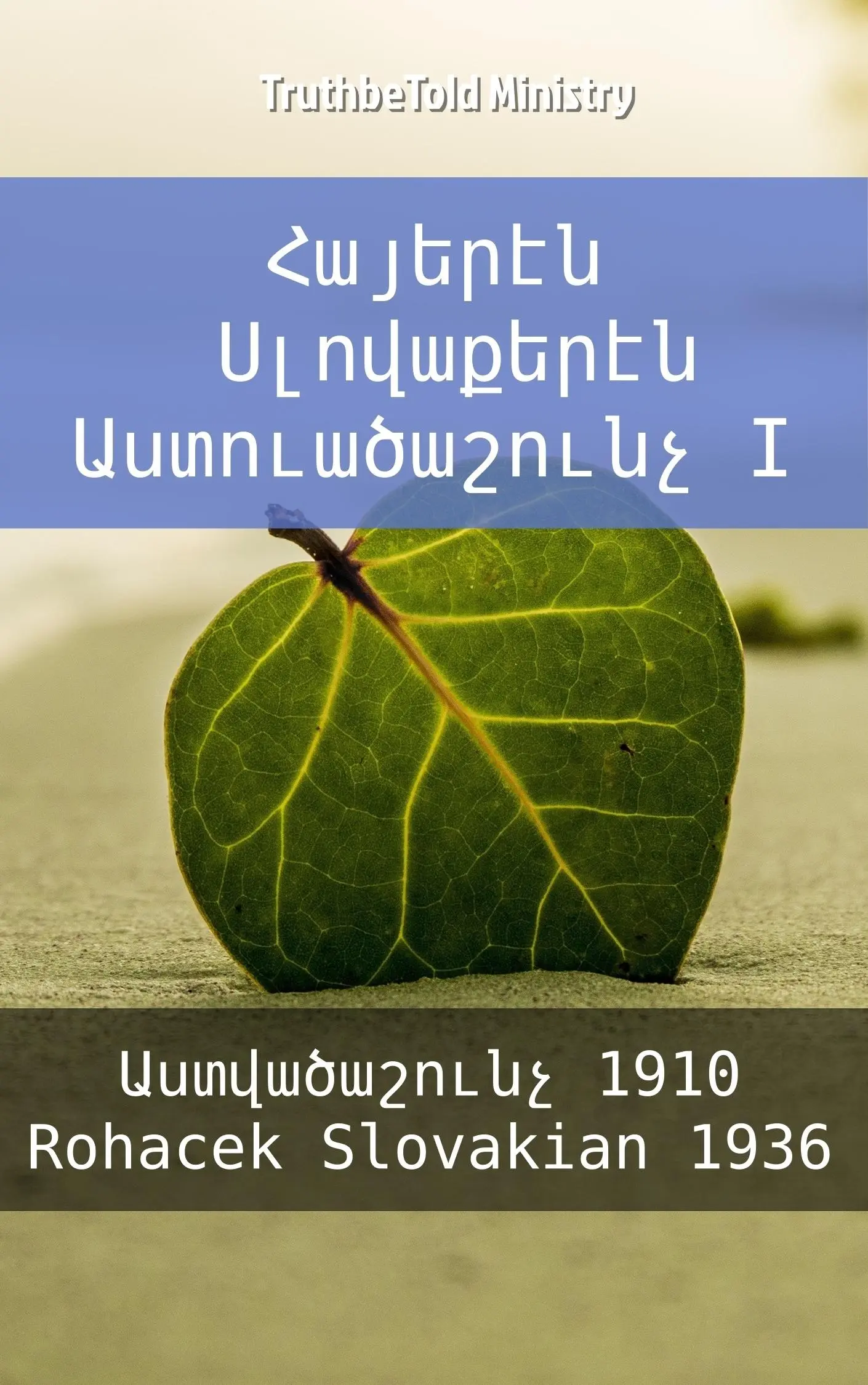
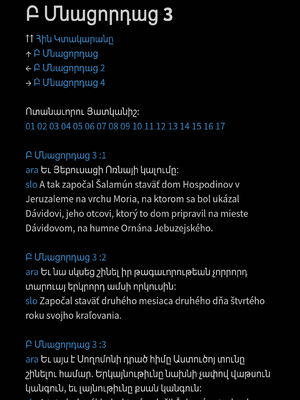
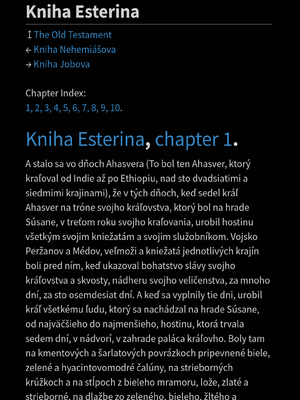
This Armenian and Slovak parallel Bible ePub aligns the Armenian Bible 1910 (Աստվածաշունչ) and Roháčkova Biblia 1936 verse by verse. It contains the complete Old Testament and New Testament, with an index of books, chapters, and verses. Spanning 4,491 pages in print equivalent, it is for readers who study the Bible in more than one language. Volume 25 in the Parallel Bible Halseth Armenian series, published in 2017.
Language
Armenian
Author
TruthBeTold Ministry, Bible Society Armenia
Translator
Jozef Roháček
Format
ePub — phone, tablet, e-reader
Length
4,491 pages
Series
Parallel Bible Halseth Armenian
ISBN
9788233916961
Published
2017-10-21
Այս հրատարակությունը պարունակում է Աստվածաշունչ (1910) և Roháčkova slovenská Biblia (1936) զուգադիր թարգմանություն. Այն ունի 173,288 հղումներ և ցույց է տալիս 2 Աստվածաշնչի ձևաչափերը: Այն ընդգրկում է Աստվածաշունչ և Roháčkova Biblia 1936 ձևաչափված կարդա և նավիգացիա ընկերաբար ձևաչափում, կամ ավելի սեղմ Navi-ձևաչափում: Այստեղ դուք կգտնեք տպագրված յուրաքանչյուր հատված ara-slo հերթականությամբ. Այն ընդգրկում է լրիվ, առանձին և ոչ զուգադիր, պատճենը Աստվածաշունչ և Roháčkova Biblia 1936, տեքստը-խոսքի կառուցվածքի (tts) հետևաբար ձեր սարքի համար Աստվածաշունչը ընթեռնելի կլինի:
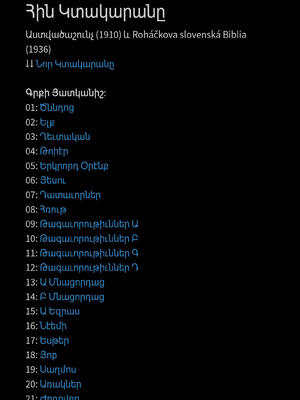
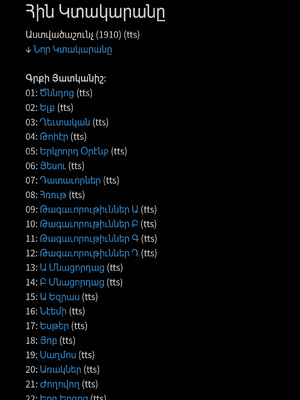
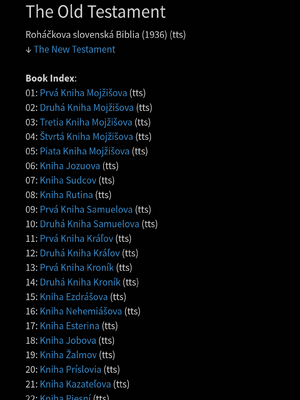
Ինչպես է հիմնական Աստվածաշնչի նավիգացիան աշխատում:
Վկայությունն ունի իր գրքերի ինդեքսը:
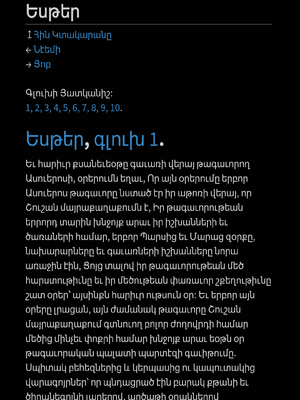
TTS ձևաչափը դասակարգում է գրքերն ու գլուխները գրքի ինդեքսից հետո:
Վկայությունները միմյանց հղումներ են անում գրքի ինդեքսում:
Յուրաքանչյուր գիրք հղում ունի այն վկայության վերաբերյալ, որին պատկանում է:
Յուրաքանչյուր գիրք հղում ունի նախորդ և հաջորդ գրքի վերաբերյալ:
Յուրաքանչյուր գիրք ունի իր գլուխների ինդեքսը:
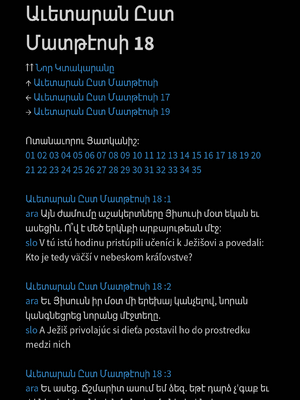
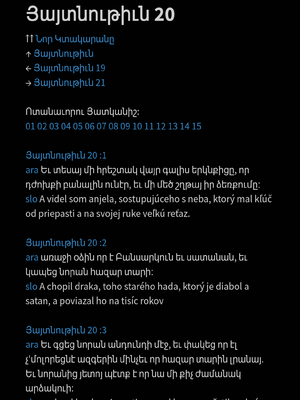
Յուրաքանչյուր գլուխ ունի հղում այն գրքի վերաբերյալ, որին պատկանում է:
Յուրաքանչյուր գլուխ հղում է անում նախորդ կամ հաջորդ գլխին:
Յուրաքանչյուր գլուխ ունի իր հատվածների ինդեքսը:
Յուրաքանչյուր գլուխ TTS-ում հղում է անում նույն գլուխը Navi-ձևաչափում:
Յուրաքանչյուր հատված համարակալվում է և հղում անում այն գլխին, որին պատկանում է:
Յուրաքանչյուր հատված սկսվում է նոր տեղից ավելի լավ ընթերցանության համար:
TTS ձևաչափում հատվածի համարները չեն նշվում:
Ցանկացած հղում ինդեքսում տանում է քեզ համապատասխան վայրը:
Բովանդակության ցանկում կառուցվածքը հղում է անում բոլոր գրքերին բոլոր ձևաչափերում.
Մենք հավատում ենք, որ ստեղծել ենք լավագույններից մեկ եթե ոչ լավագույն նավիգացիան, որը գտնվում է այսպիսի էլեկտրոնային գրքում! Այն դնում է ցանկացած հատված ձեր ձեռքի տակ և հրաշալի է արագ որոնման համար: Եւ Աստվածաշունչ և Roháčkova Biblia 1936 -ի կոմբինացիան և դրա նավիգացիան դարձնում են այս էլեկտրոնային գիրքը եզակի:
Ուշադրություն դարձրեք, որ Տեքստը-Խոսքի (TTS)-ի աջակցությունը սարքից սարք տարբերվում է: Որոշ սարքեր աջակցում են այն: Մյուսները աջակցում են միայն մեկ լեզվի, և որոշները` շատ լեզուների գաղափարին: TTS-ի համար օգտագործվող լեզուն այս էլեկտրոնային գրքում.
Ձեր ePub Աստվածաշունչը — ինչ եք ստանում և ինչպես կարդալ այն
Ի՞նչ է ePub ֆայլը։
ePub-ը թվային գիրք է։ Այն կարելի է բացել ցանկացած հեռախոսում, պլանշետում կամ համակարգչում՝ iPhone, iPad, Mac, Android կամ Windows։ Apple սարքերում այն բացվում է Apple Books-ում, որն արդեն տեղադրված է, իսկ մյուս սարքերում բավական է ցանկացած անվճար ePub ընթերցիչ ծրագիր։ Բացելուց հետո այն մնում է Ձեր գրադարանում, ինչպես ցանկացած այլ գիրք։ Տեքստը հարմարվում է Ձեր էկրանին, և Դուք ինքներդ եք ընտրում տառաչափը, ինչպես նաև էջի բաց կամ մուգ տեսքը։
Ի՞նչ եմ ես կոնկրետ ստանում։
Ստանդարտ ePub ֆայլ — Աստվածաշունչը ձերն է՝ ներբեռնելու և պահելու համար։ Այն DRM-free է, ուստի կարող եք կարդալ այն ձեր անձնական այնքան սարքերի վրա, որքան ցանկանում եք՝ առանց բաժանորդագրության և կապվածության։ Վճարումը հաստատվելուն պես ներբեռնման հղումը պատրաստ է։
Կարո՞ղ եմ կարդալ առանց ինտերնետի՝ օֆլայն։
Այո։ Ներբեռնելուց հետո ամբողջ Աստվածաշունչը գտնվում է Ձեր սարքում։ Կարդացեք տանը, գնացքում կամ ինքնաթիռում՝ առանց ինտերնետի։ Գիրքն ինքը երբեք Ձեզ չի ընդհատում՝ ոչ ծանուցումներ, ոչ շեղող բաներ, միայն տեքստը։
Ինչպե՞ս կարդալ ePub — ո՞ր հավելվածն է ինձ անհրաժեշտ։
Ցանկացած անվճար ePub ընթերցիչ. հավելվածն անվճար է բոլոր հարթակներում։ iPhone, iPad և Mac սարքերի վրա օգտագործեք Apple Books (ներկառուցված է)։ Android-ի վրա օգտագործեք Google Play Books կամ անվճար ընթերցիչ, ինչպիսիք են Librera-ն կամ Moon+ Reader-ը։ Windows կամ Linux-ի դեպքում օգտագործեք Calibre: Պարզապես բացեք ներբեռնված .epub ֆայլը սրանցից մեկով, և այն կաշխատի։
Ո՞ր սարքերն ու էլեկտրոնային գրքերի ընթերցիչներն են ապահովվում։
Ցանկացած սմարթֆոն, պլանշետ կամ համակարգիչ, ինչպես նաև ժամանակակից էլեկտրոնային գրքերի ընթերցիչների մեծ մասը — Kobo, Tolino, PocketBook և Nook կարդում են ePub-ն անմիջապես։ Kindle-ի համար օգտագործեք Amazon-ի Send to Kindle-ը՝ ֆայլն ավելացնելու համար. Kindle-ը կփոխարկի ePub-ը ձեզ համար։
Ի՞նչ կա ներսում։
Հրատարակությունների մեծ մասը բաղկացած է երկու մասից։ Առաջինում առկա են համարները՝ ուսումնասիրության համար, իսկ զուգահեռ Աստվածաշնչում երկու թարգմանությունները կողք կողքի են՝ համար առ համար։ Երկրորդ մասում յուրաքանչյուր թարգմանություն տրված է առանձին՝ առանց համարների, որպեսզի տեքստը սահուն կարդացվի սկզբից մինչև վերջ, իսկ Ձեր սարքը կարող է նաև բարձրաձայն կարդալ այն, եթե ունի այդ հնարավորությունը։ Յուրաքանչյուր հրատարակություն ունի նաև մանրամասն բովանդակություն, որն անմիջապես տանում է ցանկացած գրքի, գլխի կամ համարի մոտ։
Կարո՞ղ է այն բարձրաձայն կարդալ Աստվածաշունչը ինձ համար։
Այո — առանց համարների մասը ստեղծված է հենց դրա համար։ Օգտագործեք ձեր սարքի ներկառուցված տեքստից ձայն (text-to-speech) հնարավորությունը (օրինակ՝ Speak Screen iOS-ի վրա կամ Select-to-Speak Android-ի վրա), և ձեր սարքը կկարդա Աստվածաշունչը ձեզ համար։ Տեքստից ձայն ֆունկցիայի ապահովումը և հասանելի ձայները կախված են ձեր սարքից։
Դուք առաջարկո՞ւմ եք զուգահեռ և ուսումնասիրության Աստվածաշնչեր։
Այո։ Մենք հրատարակում ենք զուգահեռ Աստվածաշնչեր՝ երկու կամ ավելի թարգմանություններով կողք կողքի, համար առ համար, և ուսումնասիրության հրատարակություններ եբրայերեն և հունարեն Strong's համարներով, բառարաններով և միլիոնավոր ներքին խաչաձև հղումներով։ Որոնեք խանութում ձեր լեզուն, զուգահեռ (parallel) կամ ուսումնասիրության (study)։
Ինձ պե՞տք է հաշիվ։
Ոչ։ Կարող եք գնել առանց հաշվի՝ ներբեռնման հղումը հայտնվում է վճարումից անմիջապես հետո և գործում է 7 օր՝ մինչև 3 ներբեռնում։ Պահպանեք ֆայլը, և այն Ձերն է։ Իսկ եթե գնում եք անվճար հաշվով, Ձեր Աստվածաշնչերը կապված են մնում Ձեր էլ. փոստին, և Դուք կարող եք դրանք կրկին ներբեռնել ցանկացած պահի։
Ինչպե՞ս է կատարվում վճարումը — արդյոք այն անվտա՞նգ է։
Վճարումն իրականացվում է Stripe-ի կողմից, որն աշխարհում առաջատար վճարային համակարգերից է. մենք երբեք չենք տեսնում ձեր քարտի տվյալները։ Դուք կստանաք անդորրագիր էլ. փոստով։
Կարո՞ղ եմ գումարի վերադարձ ստանալ։
Ոչ։ Յուրաքանչյուր Աստվածաշունչ թվային ֆայլ է, որը տրամադրվում է հենց այն պահին, երբ վճարում եք, ուստի բոլոր վաճառքները վերջնական են և գումարի վերադարձ չի կատարվում — ոչ սխալ հրատարակության, ոչ սխալ լեզվի, ոչ կրկնակի գնման, ոչ էլ մտափոխվելու համար։ Վճարման պահին դուք հրաժարվում եք 14-օրյա հրաժարման իրավունքից, և այդ մասին ձեզ տեղեկացվում է վճարելուց առաջ։ Եթե մեր տրամադրած ֆայլն իսկապես թերի է — վնասված է կամ չի համապատասխանում իր էջում նկարագրվածին —, գրեք մեզ https://tbtm.sale/contact հասցեով, և մենք այն կփոխարինենք։ Ամբողջական պայմանները՝ https://tbtm.sale/returns։
I want a Bible I can read in my own language. Where do I start?
Readers can browse Bible editions by language, then check the translation and format before buying. The catalogue includes single-language and parallel editions; choose the specific edition rather than assuming every book contains the same translations.
Can I read two translations side by side while I study?
Bilingual readers and Bible students can choose parallel editions with translations placed verse beside verse. Check each product description for the exact language pair and translations; the catalogue contains different combinations.
Our church needs digital Bibles for the people we serve. What can we use?
Churches, schools and missions can use an Organization library pass to obtain editions for their organization and its outreach. Its licence permits sharing within that work without charging recipients, while the pass account stays with one organization. Read the current pass terms and allowances in the store.
My family reads in different languages. Do we need to buy every edition separately?
Families and small groups can compare individual purchases with a Personal library pass. The pass provides catalogue access subject to the current allowance, while the personal licence limits how files and the account may be shared. Read the licence before distributing copies beyond your household.
I am helping a school or ministry build a digital Bible library. Can one pass cover us?
A school or ministry can consider the Organization pass instead of purchasing every title separately. One pass covers one organization and its outreach, with access and download allowances described on the pass page. It does not permit reselling editions or passing the account to another organization.
I want to give Bibles to people, but our church has very little money. Is there help?
Churches and ministries can follow the free Bible offer linked from this store to request digital editions for their work. The offer has its own registration and sharing conditions; read those before requesting or distributing files. For a personal gift or a different arrangement, contact the ministry before buying rather than assuming an ordinary purchase transfers a licence.
How can I use TruthBeTold Ministry to choose and buy a Bible?
Tell your AI your language and preferred translation; it can call list_books, then get_book for the editions you want to inspect. Open the selected product page and complete the secure checkout yourself. Guest purchase is available with optional delivery email, while an account and cart provide the signed-in shopping route; save your download and receipt links.
How can I use TruthBeTold Ministry to buy several Bibles together?
Ask your AI to find the editions you need; it can call list_books and get_book to prepare a shortlist. Sign in, add the editions to the store cart and complete one checkout yourself. The cart bundles the selected editions in one order; check the language and translation of each before paying.
How can I use TruthBeTold Ministry to choose a library pass?
Ask your AI to compare access for your household with access for your church, school or mission. It should read /passes and /license, explain the Personal and Organization licences, and direct you to the current store offer and allowance. A pass opens the catalogue for its subscription period; previously acquired titles can be downloaded again without using a new-title allowance. See the store for current terms and offers.
Will my library pass renew, and how can I cancel?
Library passes renew automatically on their billing cycle until cancelled. Signed-in pass holders can follow Manage or cancel from the passes page; contact the ministry if you need help. Cancelling stops future billing without refunding the current period, and files already saved on your devices remain available to you under their licence.
How can I use TruthBeTold Ministry to find the languages and translations I need?
Tell your AI which language or language pair you want; it can call list_books with a language filter and search terms, then get_book for individual editions. You can also browse the language shelves at /bibles and follow them into the store. The catalogue includes many parallel editions, so check the listed translations on the product page before choosing.
How can I use TruthBeTold Ministry to see the offer for my country?
Ask your AI to help locate an edition with list_books and get_book, then open its store page yourself. Use the Country picker to view the supported country and currency options, and review the amount and terms shown at checkout. The store is the source for the current offer; a catalogue summary is not a checkout quote.
Can I get a refund if I change my mind or choose the wrong edition?
The store states that digital sales are final, including a wrong edition, duplicate purchase or change of mind, and asks for consent to immediate delivery at checkout. Read /returns and /sla before paying, and check the language and translation carefully. The policy separately preserves statutory rights for defective delivery and correction of a charge duplicated by the seller’s error.
My file will not open, or I received something different from the description. What should I do?
Contact the ministry through /contact and describe the edition and the delivery problem. A corrupt file or an edition that does not match its description is handled as defective delivery, with a working replacement and statutory rights preserved. Choosing the wrong language yourself is different, so read the product description before buying.
Who publishes these Bibles, and who am I buying from?
TruthBeTold Ministry is operated by Publifye AS, the Norwegian publisher and seller behind this store. The legal pages identify the company and explain the purchase terms, licence and handling of personal data. Inspect the individual edition page for its ISBN and publication details, and read /sla and /privacy before buying.
Why buy a Bible directly here rather than through another ebook shop?
This store supplies digital editions directly as DRM-free ePub files for compatible readers. You can buy individual editions or consider a library pass over the catalogue, depending on your needs. Check the edition’s product page and licence, and keep your delivered file and recovery links; guest and account purchases have different recovery routes.